If you run digital campaigns, publish newsletters, or share links on social media, UTM parameters are one of the simplest tools that give you powerful answers: where did my traffic come from, how did it arrive, and which campaign drove the results?
This article explains what UTM parameters are, lists the available parameters, shows how to use them in practice, walks you through creating UTM-tagged links (manually and with a generator), and finishes with a short checklist of best practices and common mistakes.
What are UTM parameters?
UTM stands for Urchin Tracking Module – a name that dates back to the Urchin analytics product and stuck when Google acquired it. In short, UTM parameters are tiny pieces of text appended to a URL that tell analytics tools important context about a click: the source of the click, the medium or channel, the campaign name, and sometimes the ad or keyword that generated it.
When someone clicks that tagged URL, the analytics platform reads those tags and attributes the visit to the right campaign.
UTMs don’t change the page content or affect SEO – they’re simply query parameters (the ?utm_… part of a URL) captured by analytics tools. Analytics platforms such as Google Analytics provide special reports that use those parameters to show which campaigns, channels and creatives actually drive traffic and conversions.
The standard UTM parameters (the five you should know)
While you might only use three or four in most cases, there are five standard UTM parameters available to you. They are grouped into three required parameters for basic tracking, and two optional parameters for granular detail. Mastering all five allows for the deepest levels of campaign insight.
The required UTM parameters: Source, Medium, Campaign
These three parameters form the bedrock of almost all UTM tracking. They allow you to answer the fundamental questions about your traffic with clarity.
1. utm_source (The Where)
- What it tracks: The specific place the traffic originated from. This is the referring site or platform.
- Purpose: Identifies the referral source, helping you attribute traffic to external entities.
- Common Values:
google, facebook, linkedin, newsletter, blog-post, affiliate_program_name. - In-Depth: The
utm_sourceis perhaps the most straightforward parameter, but consistency is paramount. For example, if you post a link on Twitter, your source should betwitter. If it’s a link in your monthly email, it could benewsletterormailchimp. The key is to standardize this name across your team. If you name itFacebookonce andfacebookanother time, your analytics platform may treat them as two separate sources. Best practice is to always use lowercase for consistency. This parameter helps you quickly compare the raw volume of traffic from one site to another.
2. utm_medium (The How)
- What it tracks: The mechanism or medium used to deliver the link. This is the category or type of marketing channel used.
- Purpose: Separates traffic into broad, strategic types, which is essential for channel-level ROI comparison.
- Common Values:
cpc(Cost-Per-Click/Paid), email, organic_social, referral, display, affiliate. Avoid using channel names here (like ‘Facebook’ or ‘Google’); those belong in the utm_source field. - In-Depth: The
utm_mediumprovides a higher-level view than the source. It groups your marketing efforts into types. When you look at your overall performance, you can see how all your paid campaigns (cpc) stack up against all your email campaigns (email). This parameter is vital for budget allocation and understanding which types of marketing channels are most efficient at driving conversions, regardless of the specific platform (source). For example, traffic from a paid Facebook ad and a paid Google ad would both use the medium cpc.
3. utm_campaign (The Why)
- What it tracks: The specific product promotion, seasonal sale, or strategic initiative the link is associated with.
- Purpose: Groups all content and efforts related to a single, overarching marketing initiative across multiple sources and mediums.
- Common Values:
summer_sale_2025, ebook_launch_q4, brand_awareness_pilot, winter_promo. Use hyphens or underscores for separation, not spaces. - In-Depth: The
utm_campaignis arguably the most powerful parameter for ROI analysis. It ties all your diverse efforts—across multiple sources and mediums—back to a singular objective. If you’re running a sale, every single link promoting that sale, whether posted on social media, sent via email, or placed in a display ad, should use the exact same campaign tag (e.g.,summer_sale_2025). This allows you to open your analytics, filter by that campaign name, and see the collective performance, costs, and revenue generated from that entire initiative, regardless of where the individual clicks originated.
The optional UTM parameters: Term, Content
These two parameters are not strictly necessary for every link, but they are incredibly useful for granular testing and tracking within a single campaign, allowing you to move beyond what worked to what exactly worked.
4. utm_term (The Keyword/Target)
- What it tracks: Primarily used to track paid search keywords for non-Google platforms, or sometimes for identifying specific audience segments.
- Purpose: Records the exact keyword a user searched for in paid campaigns, or an internal tag for audience/target type.
- Common Values:
digital_marketing_services, best_seo_agency, retargeting_audience. - In-Depth: While platforms like Google Ads automatically pass this keyword data, you’ll use
utm_termfor other paid channels (like running ads on LinkedIn or Bing) where auto-tagging isn’t available or very robust. For non-paid campaigns, some savvy marketers repurpose this field to identify the target audience the link was aimed at (e.g.,utm_term=existing-customersvs.utm_term=new-leads), providing valuable audience-level insights within the same campaign.
5. utm_content (The Test/Differentiator)
- What it tracks: Used to differentiate between multiple links pointing to the same URL within the same context. Crucial for A/B testing creative elements.
- Purpose: Identifies which specific version of an ad, button, banner, or link performed better.
- Common Values:
red_button, blue_text_link, sidebar_banner, hero_image_cta, v2-image-ad. - In-Depth: This parameter is the secret weapon of the conversion optimizer. It allows you to run A/B tests without needing external tools. Want to know if your text link converts better than your image banner in a newsletter? Tag them both with the same campaign, source, and medium, but give them different
utm_contentvalues. For example, in a single email, you link to the same product page from two places: a button and a text link. You would useutm_content=cta-buttonfor the button link andutm_content=inline-textfor the other. The results will instantly tell you which creative element is driving the most valuable traffic.
Why use UTMs? The practical benefits
Precise attribution: Track exactly which ad, email or social post delivered a visit or conversion. This beats relying on generic channels like “Direct” or “Referral.”
Cross-platform clarity: When you use the same naming scheme across channels, you can compare performance apples-to-apples.
Better reporting and budget decisions: Knowing which campaigns and creatives work lets you allocate spend to the top performers.
How to create a UTM-tagged link (step-by-step)
There are two common approaches: manual construction and using a UTM generator such as the one we provide for free (recommended for saving time and avoiding typos and the added functionality of being able to export generated links directly into a CSV file).
If you want to go for the manual method, or just want to understand how to add and read UTM parameters, here’s what you need to do.
- Start with the landing page URL (without parameters), e.g.:
https://www.example.com/landing-page/ - Add a question mark ? and then the UTM parameters in key=value pairs separated by &.
Example (all lower-case, underscores for spaces):https://www.example.com/landing-page/?utm_source=facebook&utm_medium=cpc&utm_campaign=summer_sale&utm_content=video_ad_1 - If your URL already has parameters, append UTM tags with & instead of ?.
Example:https://www.example.com/?ref=partner123&utm_source=newsletter&utm_medium=email&utm_campaign=spring_launch - Test the link in your browser and in your analytics tool (click it yourself and check if the session attributes appear in reports). Always test before widespread use.
Practical tips – naming conventions and hygiene
Good UTM discipline saves hours of reporting confusion. That is why we recommend you follow a few key rules:
- Be consistent: decide on lowercase vs uppercase (lowercase is recommended) and whether you’ll use underscores or dashes. UTMs are case-sensitive in many platforms, so Twitter and twitter will be treated as separate sources.
- Keep tags short and descriptive:
utm_campaign=black_fridayis better thanutm_campaign=massive_end_of_year_super_discount. - Avoid using personal or sensitive data: UTMs show up in URLs, so never include personal identifiable information.
- Don’t use UTMs on internal links: tagging internal links breaks session attribution and can split a user’s original source. Keep in mind UTMs are for external-to-site links only.
- Use a central UTM naming doc: maintain a shared spreadsheet or naming library so everyone on the team follows the same rules. Use tools like our generator which lets you bulk-create links and download CSVs for consistent application.
- Test every link: click the final URL, make sure it reaches the right page, and verify the UTM dimensions appear in your analytics platform.
How analytics tools use UTM parameters (short overview)
When a user clicks a tagged link, the analytics platform grabs the UTM values and maps them to traffic-source dimensions (source, medium, campaign, term, content). In Google Analytics, those are used in acquisition reports and explorations to break down sessions and conversions by campaign. Google’s docs and URL-builder guidance explain this flow and recommend setting all relevant UTM parameters to avoid misattribution.
With Google Analytics 4 (GA4), you can use the same UTM parameters – GA4 reads them into its session and traffic_source dimensions – and you can analyze them in explorations and reports like before.
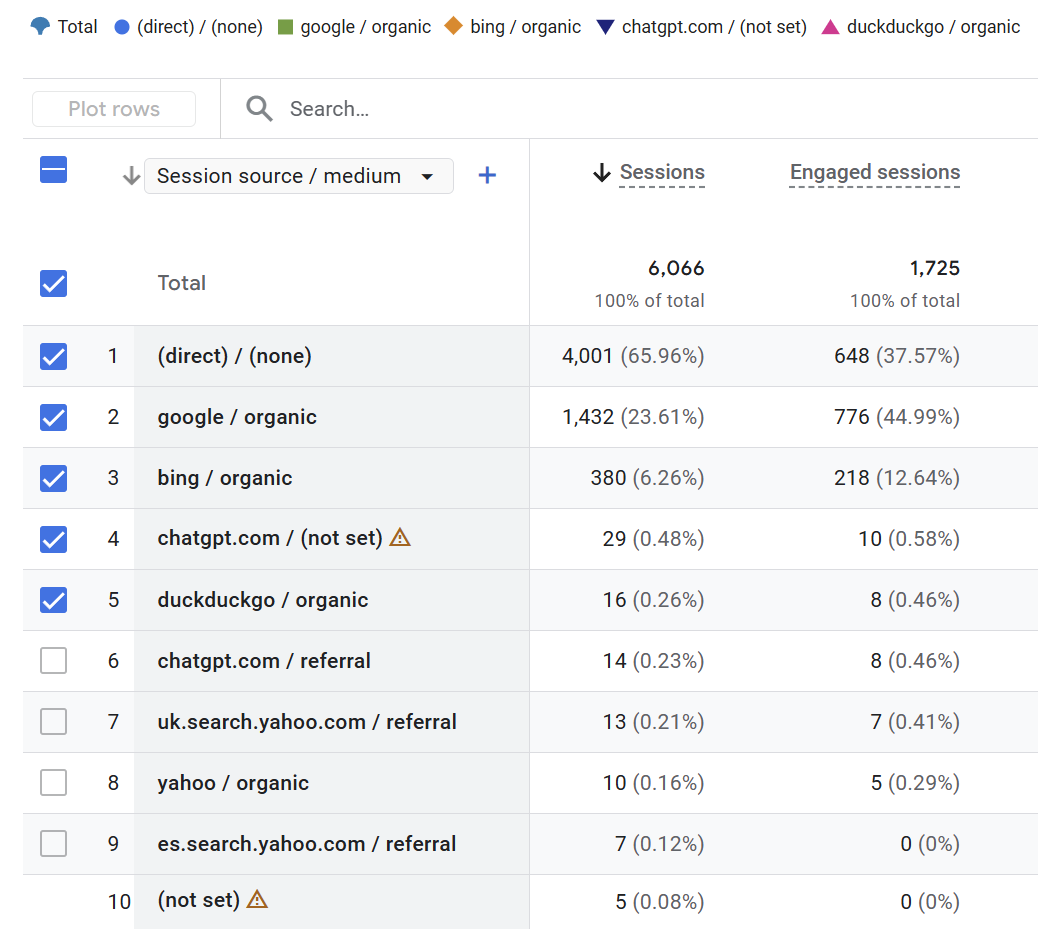
Common mistakes when using UTM parameters and how to avoid them
- Mixing cases and delimiters:
utm_source=Facebookvsutm_source=facebookcreates fragmented data. Standardize on lowercase and one delimiter. - Using spaces: use hyphens or underscores instead (e.g.,
spring_sale) - Forgetting to tag some channels: If you only tag paid ads but forget to tag organic posts or email, attribution will be inconsistent. Tag everything external (if possible).
- Over-tagging internal links: This restarts sessions and corrupts referral chains. Never add UTMs to internal navigation.
- Using overly long or cryptic campaign names: Keep campaign names readable and mappable to your ad platform campaign names.
Next steps after UTM tagging: analyzing your data
UTM parameters only deliver value when their data is actually used to make decisions. Once your links are consistently tagged and reporting is in place, you can start using insights to refine your strategy.
Common ways to use UTM insights include:
- Shifting budget toward the highest-performing sources and mediums
- Iterating on creatives and messages that drive the best utm_content performance
- Comparing campaigns over time to understand seasonality and trends
- Identifying underperforming channels that need optimization or may not be worth further investment
Over time, this measurement discipline compounds, producing clearer ROI evidence and helping your marketing team communicate results more effectively to stakeholders and clients.
UTM parameters help you understand your digital marketing efforts
UTM parameters are not a trendy new tool; they are a fundamental, time-tested component of effective digital marketing measurement. They are the key to unlocking the granular insights hidden within your website traffic, allowing you to definitively answer the most critical question in marketing: Where did this result come from?
Understanding UTM parameters is the first step toward a data-driven strategy. But maximizing the return on investment from those insights – through expert campaign creation, optimization, and advanced analytics – requires dedicated expertise.At JPG MEDIA, we specialize in transforming raw data into powerful, profitable marketing strategies.
We do more than just generate links; we build comprehensive, measurable strategies from the ground up. Whether you need help setting up your tracking infrastructure, designing high-converting campaigns, or analyzing the data generated by your perfectly tracked UTM links, we are here to help you achieve measurable, sustainable growth. Get in touch and let’s get your marketing to the next level.